
← 返回市场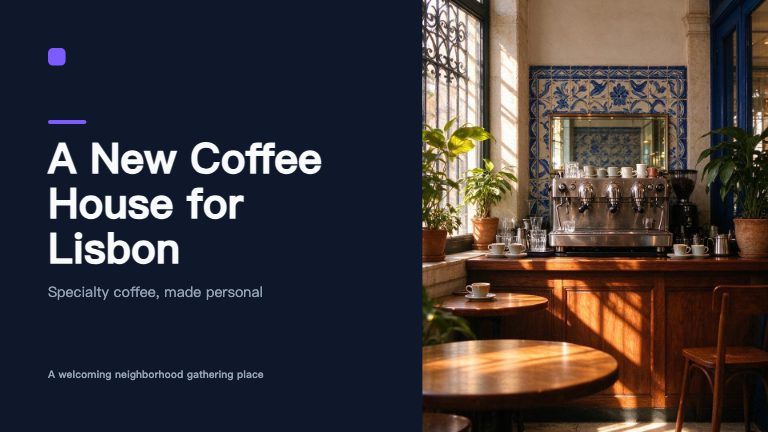
办公 · ModelFold
ModelFold PPT 1.1NEW
发一个主题(可以附上笔记或文章),拿回一整套可编辑的演示文稿:先出大纲,再生成 6–50 页、10 种专业版式,全套统一主题(含页码、页脚),可选 AI 配图,文件支持 PPTX、PDF、PNG。每套 PPT 都会存进你的 Studio,可以继续编辑。
一次 API 调用的真实输出(8 页,午夜主题,开启 AI 配图)。
先大纲,再成页
模型先规划故事线,再分批写每一页,整套内容前后连贯。
10 种专业版式
封面、目录、章节页、要点、左右两栏、图文、数据大字、引言、时间线、结束页。
全套统一主题
6 套主题,每页共用配色、字体、页码、页脚和 Logo 位。
只在需要的地方配图
只给需要图片的版式生成 AI 配图,也可以关闭以节省积分。
可编辑的 PPTX
文字框和形状都是 PowerPoint 原生对象,不是截图;也支持 PDF 和 PNG。
在 Studio 继续编辑
每个结果都带一个链接,Key 的主人可以直接在 ModelFold Studio 里打开继续改。
调用流程
- 用 POST /api/v1/jobs/createTask 创建任务(与其他模型相同的异步协议、API Key、幂等键和回调)。
- 轮询 GET /api/v1/jobs/recordInfo?taskId=… 或等待回调。长篇大纲分段生成,正文每批 4 页、最多 3 批并发;50 页及导出请预留数分钟。
- 从 resultObject.files 下载文件。和其他生成文件一样保留 30 天。
参数
POST /api/v1/jobs/createTask · model: "modelfold-ppt-1.1" · 放在 input 里
| 名称 | 类型 | 必填 | 默认值 | 说明 |
|---|---|---|---|---|
| input.prompt | string | 是 | — | 主题或一句话需求(2–1000 字)。也可写作 topic。 |
| input.content | string | 否 | — | 资料:笔记、事实或一篇文章(最多 20000 字),PPT 会按它来写。也可写作 notes。 |
| input.slides | integer | 否 | 10 | 页数,6–50。 |
| input.language | string | 否 | en | 文字语言:zh、en、ja、es、ko、fr、de、pt。 |
| input.theme | string | 否 | midnight | 主题:midnight, corporate, paper, forest, sunset, mono。 |
| input.template | string | 否 | — | 模版 ID(优先于 theme)。POST /v1/studio/templates/upload 上传 {name, data: PPTX base64},返回 template_id;GET /v1/studio/templates 查本人模版,GET /v1/studio/templates/public 查公开/官方 ID。配色、字体和基础版式跟随模版;AI 分析图片画风、光感、构图与纹理,写入每页生图提示,支持时同时传参考图。 |
| input.ai_images | boolean | 否 | true | 是否生成 AI 配图;最多预扣 min(12, ceil(页数 × 0.4)) 张,按实际成功张数结算。 |
| input.output_formats | string[] | 否 | ["pptx"] | 可选 pptx、pdf、png(每页一张 PNG 的 ZIP)、json(Studio 文档)。 |
顶层的 callBackUrl + callbackSecret 和请求头 Idempotency-Key 的用法与其他异步模型完全相同。
请求示例
curl -X POST https://ai.modelfold.online/api/v1/jobs/createTask \
  -H "Authorization: Bearer $MODELFOLD_API_KEY" \
  -H "Content-Type: application/json" \
  -d '{
    "model": "modelfold-ppt-1.1",
    "input": {
      "prompt": "Pitch deck for a specialty coffee shop opening in Lisbon",
      "content": "Optional notes, facts or an article to base the deck on",
      "slides": 10,
      "language": "en",
      "theme": "midnight",
      "template": "TEMPLATE_ID",
      "ai_images": true,
      "output_formats": ["pptx", "pdf"]
    }
  }'

# Poll until state is "success" or "fail"
curl "https://ai.modelfold.online/api/v1/jobs/recordInfo?taskId=TASK_ID" \
  -H "Authorization: Bearer $MODELFOLD_API_KEY"
返回结果
{
  "code": 200,
  "msg": "success",
  "data": {
    "taskId": "7ca7b5c7-6a5b-4c81-a72e-cfd6c9eb9e57",
    "model": "modelfold-ppt-1.1",
    "state": "success",
    "resultJson": "{\"resultUrls\":[...],\"resultObject\":{...}}",
    "usage": { "credits": 19, "settled": true }
  }
}

// JSON.parse(data.resultJson).resultObject
{
  "title": "A New Coffee House for Lisbon",
  "slides": 8,
  "theme": "midnight",
      "template": "TEMPLATE_ID",
  "language": "en",
  "files": { "pptx": "https://…/modelfold-ppt-….pptx", "pdf": "https://…/modelfold-ppt-….pdf" },
  "cover_url": "https://…/modelfold-ppt-…-cover.jpg",
  "studio_url": "https://ai.modelfold.online/studio/edit/123",
  "ai_images": { "requested": true, "generated": 2 },
  "outline": [{ "index": 1, "type": "cover", "title": "…", "points": ["…"] }],
  "billing": { "credits": 19, "base": 3, "per_slide": 0.5, "per_image": 6 }
}files.pptx可编辑的 PowerPoint 文件files.pdfPDF(每页一张高清图)files.png_zip每页一张 PNG 的 ZIPfiles.jsonStudio 文档 JSONstudio_url在 Studio 打开继续编辑(Key 的主人)outline每页类型、标题和要点slides页数ai_images请求 / 实际生成的配图张数billing最终积分和价格明细