 ModelFold
qwen3/pro-text-to-image
Qwen Image 3.0 is Alibaba's advanced image generation model for realistic images, structured layouts, rich visual details, and high-quality typography.
Pricing: 1K 8 credits / image, 2K 15 credits / image.
Explore more Text to Image models
More AI models from Qwen
Latest and popular AI models
Qwen Image 3 API: Text-to-Image and Image Editing
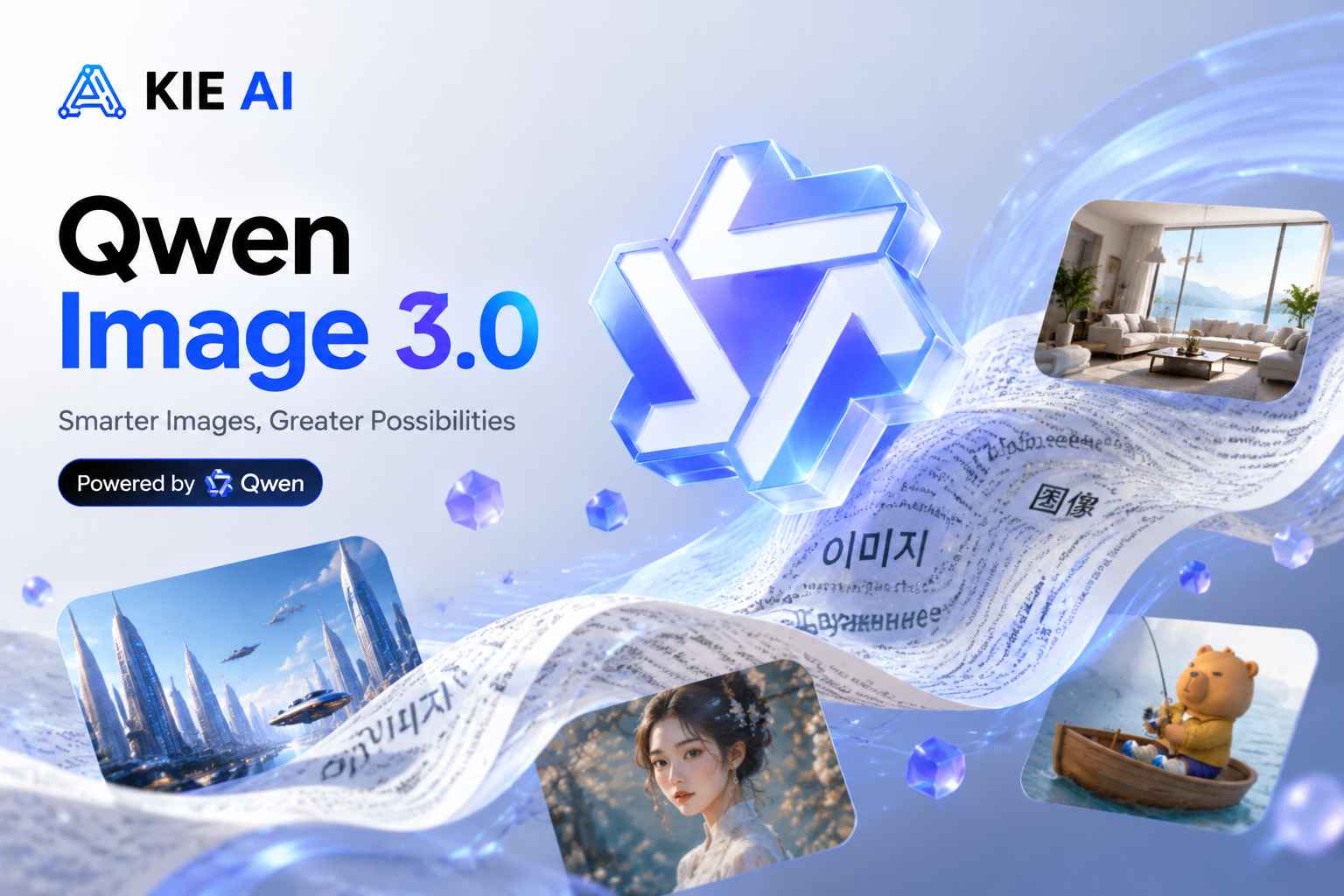
Qwen-Image-3.0 is the third-generation model in the Qwen-Image series, built for information-dense images: prompts up to 4.5K tokens, legible text down to 10px and native rendering in 12 languages. On ModelFold it runs as four API models: standard and Pro, each for text-to-image and image-to-image.
Qwen Image 3 API Parameters on ModelFold
Qwen Image 3 and Qwen Image 3 Pro accept the same parameters on ModelFold; they differ in the model itself, not in the request.
| Parameter | Value |
|---|---|
| Models | Standard: qwen3/text-to-image, qwen3/image-to-image. Pro: qwen3/pro-text-to-image, qwen3/pro-image-to-image |
| Endpoint | POST https://ai.modelfold.online/v1/images/generations; the response returns the finished image URLs |
| Prompt | Required; Chinese or English; up to 2,000 characters per request on ModelFold. Per the Qwen team, the model handles long prompts of about 4.5K tokens |
| Negative prompt | Optional; up to 5,000 characters |
| Input images (image-to-image) | 1 to 3 image URLs; JPEG, PNG, WebP, BMP, GIF or TIFF; up to 10 MB each; each input image adds a small fee, shown in the pricing card above |
| Resolution | 1K or 2K (image-to-image defaults to 1K) |
| Aspect ratio | 1:1, 3:2, 2:3, 4:3, 3:4, 16:9, 9:16, 21:9 (default 16:9) |
| Output format | PNG or JPEG |
| Prompt rewriting | prompt_extend, on by default |
| Seed | Optional, 0 to 2147483647; random if omitted |
| Pricing | Per model and resolution, shown in the pricing card above |
What Qwen Image 3 Can Generate
Each example below was generated with Qwen Image 3 Pro on ModelFold in October 2026 from the prompt described in its caption; images are shown as generated, resized for the web.
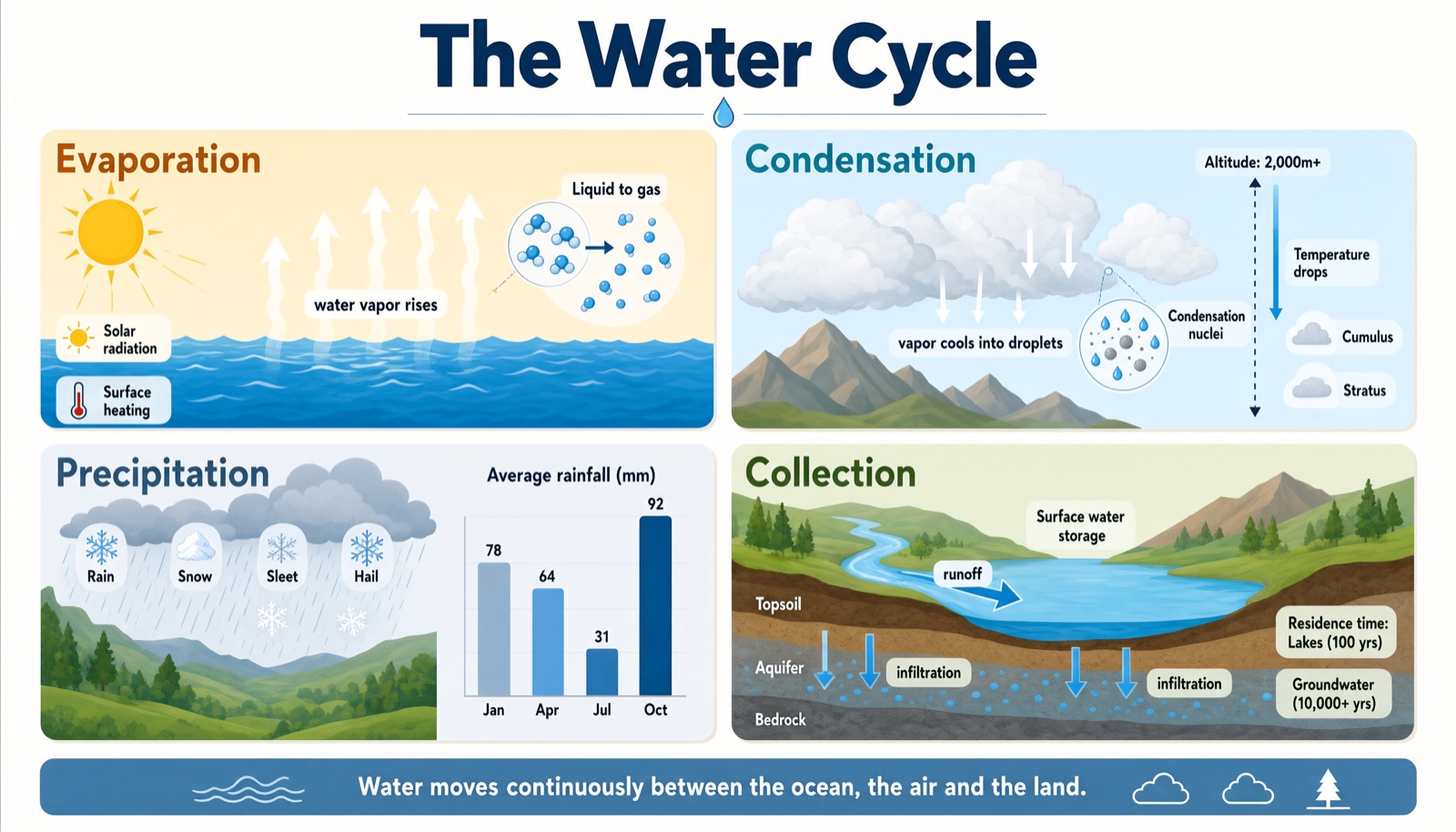
Long Prompt, Dense Layout: A Four-Panel Water Cycle Infographic
Qwen-Image-3.0 is built to follow long prompts of about 4.5K tokens, so one request can describe an entire layout. This infographic came from a single prompt of about 110 words that specified four panels, their labels, a bar chart with four values and a footer caption; all of them appear in the image.
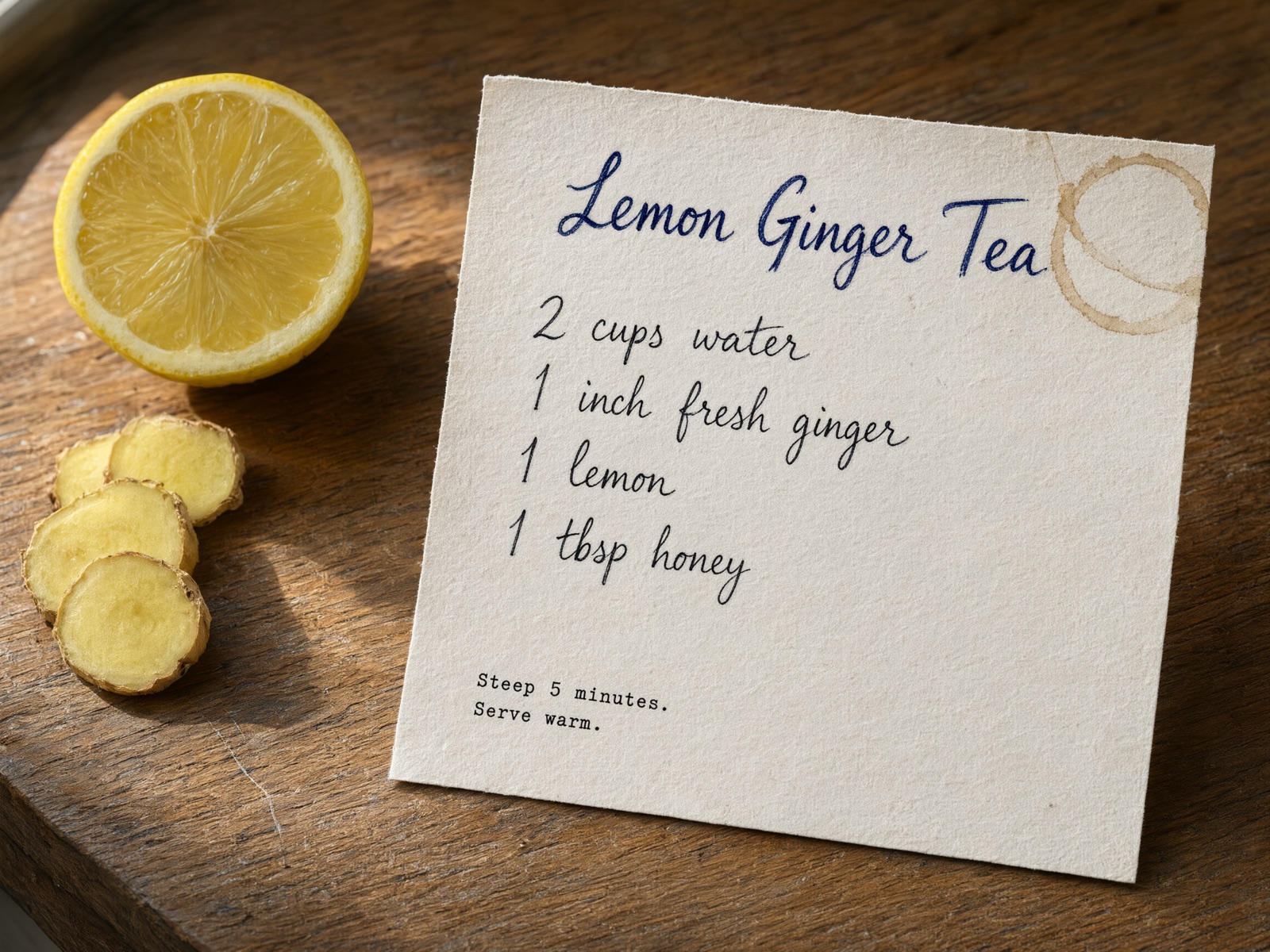
Small Text and Real Textures: A Handwritten Recipe Card on Wood
The Qwen team says the model renders text as small as 10px and fine surface detail. Here the handwritten ingredient list and the small typed note stay legible, alongside paper fibers, a faint coffee ring and wood grain.
Multilingual Text: One Poster in English, Japanese and Spanish
Qwen-Image-3.0 renders text natively in 12 languages. This phrase poster places the same four phrases in English, Japanese and Spanish, including Japanese kana and kanji and Spanish accents and inverted question marks.
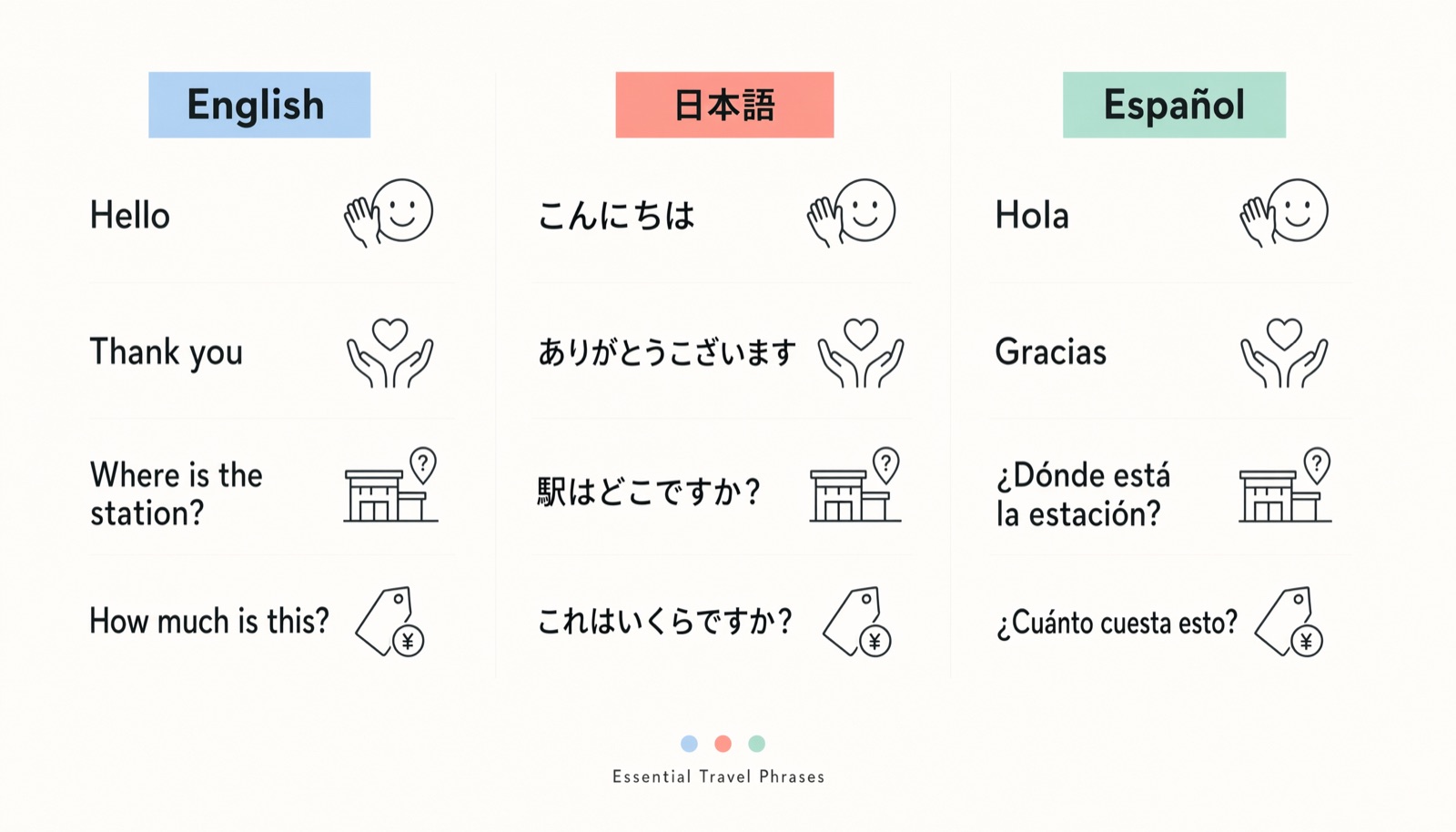
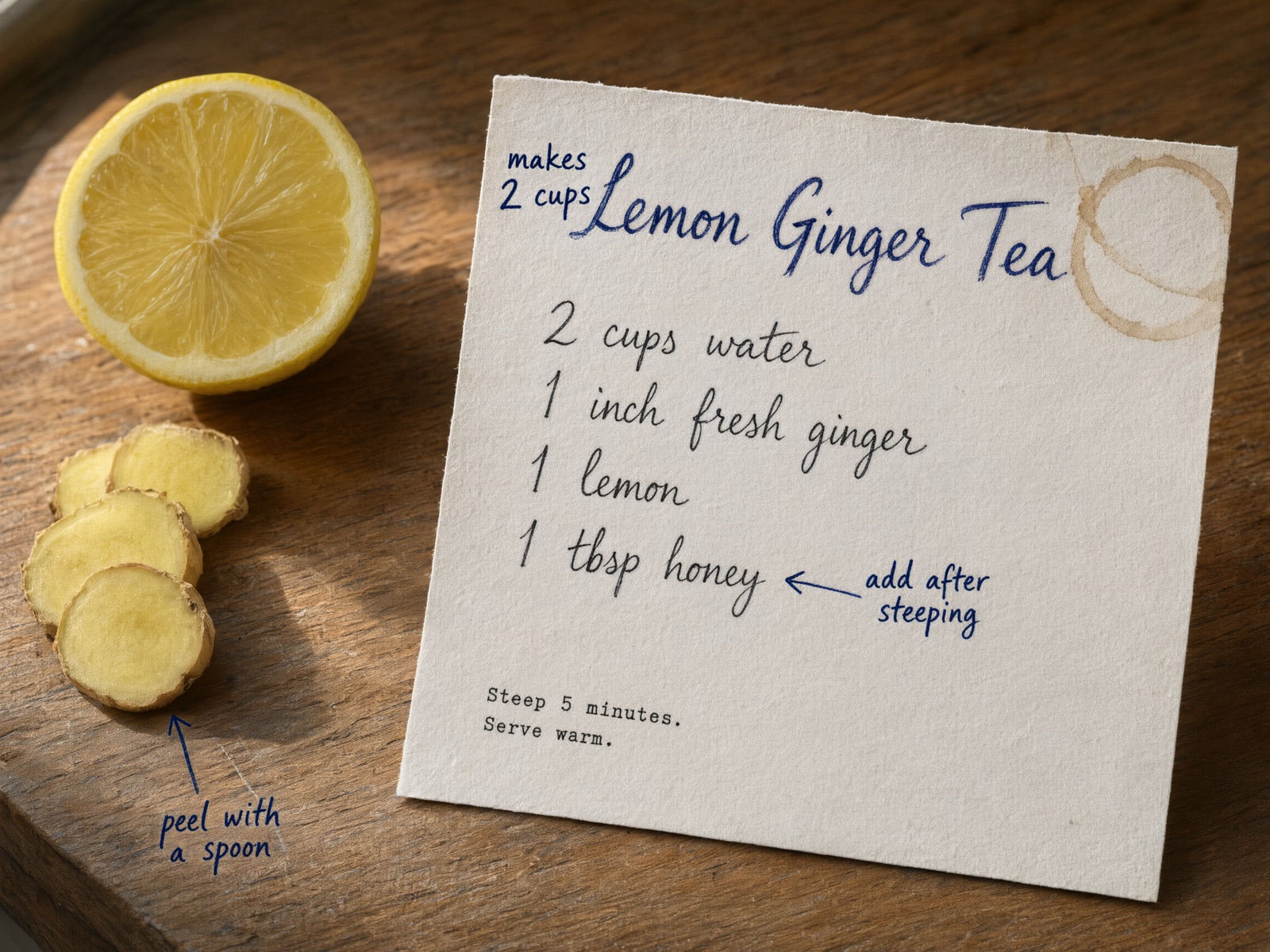
Image Editing: Handwritten Notes Added to an Existing Photo
Starting from the recipe card above, one instruction added three handwritten notes, two of them with arrows. In this edit the card, table and lighting stayed the same while the notes were added.
Qwen Image 3 vs Qwen Image 3 Pro: Which One to Use
On ModelFold the two versions take exactly the same request, so switching is a one-word change in the model name. On the Artificial Analysis text-to-image arena, Qwen-Image-3.0-Pro scores 1087 and Qwen-Image-3.0 scores 1075, and their score ranges overlap. Because the measured difference is small, a practical default is the standard model; use Pro for text-heavy final assets only if a side-by-side on your own prompts shows a difference. Pricing for each model is shown in the pricing card above. The Qwen team positions Qwen-Image-3.0 for information-dense images such as newspapers, storyboards, exam papers and interface mockups. For text specifically, LMArena's text-rendering leaderboard lists Qwen-Image-3.0-Pro at 1283, GPT Image 2 (medium) at 1425 and Seedream 5.0 Pro at 1255 (as of October 7, 2026).
| Qwen Image 3 | Qwen Image 3 Pro | |
|---|---|---|
| Models on ModelFold | qwen3/text-to-image, qwen3/image-to-image | qwen3/pro-text-to-image, qwen3/pro-image-to-image |
| Request parameters | Same as Pro | Same as standard |
| Artificial Analysis text-to-image score (Oct 2026) | 1075 | 1087 |
| LMArena text-to-image score (Oct 7, 2026) | Not listed | 1255 |
| LMArena text-rendering score (Oct 7, 2026) | Not listed | 1283 |
| Pricing | Shown in the pricing card above | Shown in the pricing card above |
Typical Uses for Qwen Image 3
The Qwen team built Qwen-Image-3.0 for images where the text and layout have to be right, not only the look. These are the kinds of work that fit.
Education and Publishing Pages
Lesson slides, exam papers, formula-heavy pages and newspaper-style layouts, where every heading, label and equation has to be readable in a single image.
Interface Mockups for Prototypes
Realistic screens for web pages, mobile apps, games and livestreams to drop into pitch decks, design reviews or early user tests before anything is built.
Localized Marketing Visuals
Posters, menus, signage and social graphics that need the same design in several languages, generated with the text in place instead of added afterwards.
Annotated Figures from Real Photos
Turning an existing photo into a labeled figure for reports, research notes or product documentation with image-to-image, keeping the original subject and adding the annotations.
How to Use the Qwen Image 3 API on ModelFold
- 1
Step 1. Get Your API Key
Sign up on ModelFold, open the API Key Management page and create a key. Every request sends it in the Authorization header.
- 2
Step 2. Test Your Prompt in the Playground
You can try this model in the playground on this page without writing code. Switch between the four models to compare outputs on your own prompts.
- ✓
Step 3. Send the Request and Get the Result
Send a POST request to https://ai.modelfold.online/v1/images/generations with the model name, your prompt and an optional resolution. The response returns the finished image URLs, so there is no task polling or callback to set up. The other parameters in the table above can all be tried in the Playground on this page.
Tips Before You Ship
Set the Output Format Yourself
The docs ask you to set output_format explicitly, so choose PNG or JPEG in every request rather than relying on a default.
Pass Image URLs, Not Files
Image-to-image takes publicly reachable image URLs.
Proofread the Text in Every Image
In one of our four test images the model added labels we did not ask for (see the infographic above), so check generated text before you publish, especially numbers and names. Prompt rewriting (prompt_extend) is on by default; if you need your exact wording, compare results with it on and off.
Why Use Qwen Image 3 on ModelFold
Same Key Across the ModelFold Market
All models in the ModelFold market use the same authentication method: an Authorization: Bearer YOUR_API_KEY header with the key from your ModelFold API Key Management page.
Free Credits to Start
New ModelFold users receive 80 free credits for testing. Your account has one credit balance that all generation services draw from; check it in your ModelFold wallet.
Nothing to Host or Install
ModelFold provides this model as an API with a playground; there is no app to download or install. There are no GPUs or model weights to manage.
Frequently Asked Questions
What is Qwen Image 3?⌄
Qwen Image 3 is the Qwen team's model for text-to-image generation and image editing, offered on ModelFold in standard and Pro versions. Its capabilities, parameters and examples are covered above.
Is Qwen Image 3 free?⌄
Not on ModelFold: each generation uses credits, as shown in the pricing card above. New ModelFold users receive 80 free credits for testing.
Can I download Qwen Image 3 or run it locally?⌄
As of October 2026, the Qwen team has not published Qwen-Image-3.0 weights on its Hugging Face page, so there is no official download for running it locally. The open-weight models there are earlier releases such as Qwen-Image 2.1. ModelFold provides this model as an API with a playground; there is no app to download or install.
How do I get a Qwen Image 3 API key?⌄
Create one on the API Key Management page after you sign up on ModelFold. The steps above show where the key goes in a request.
How much does the Qwen Image 3 API cost?⌄
Pricing for each model and resolution is shown in the pricing card above.
What is the difference between Qwen Image 3 and Qwen Image 3 Pro?⌄
Both take the same request on ModelFold; only the model name changes. The comparison table above shows their public leaderboard scores and when to start with each.
Can Qwen3 generate images?⌄
Qwen3 is the Qwen team's family of language models; image generation comes from the separate Qwen-Image series. On ModelFold the Qwen Image 3 model names start with qwen3/, for example qwen3/text-to-image, and they run Qwen-Image-3.0.
Does Qwen Image 3 support image editing?⌄
Yes. The image-to-image models take one or more input images by URL plus an instruction, and return the edited image. The parameter table above lists the input limits, and the recipe card example shows an edit.
| Pro Image To Image | |
| 1K | 8 credits / image |
| 2K | 15 credits / image |
| Pro Text To Image | |
| 1K | 8 credits / image |
| 2K | 15 credits / image |
| Text To Image | |
| 1K / 2K | 6 credits / image |
| Image To Image | |
| 1K / 2K | 6 credits / image |
Pro Image To Image:1K 8 credits / image, 2K 15 credits / image; each reference image +0.625 credits (total rounded up).
Image To Image:1K 6 credits / image, 2K 6 credits / image; each reference image +0.625 credits (total rounded up).
curl https://ai.modelfold.online/v1/images/generations \
  -H "Authorization: Bearer $MODELFOLD_API_KEY" \
  -H "Content-Type: application/json" \
  -d '{"model":"qwen3/pro-text-to-image","prompt":"..."}'