 ModelFold
gpt-image-2-5-flare-text-to-image
GPT Image 2.5 is an advanced image generation and editing model from OpenAI, designed for sharper visual quality, stronger reference fidelity, and more precise refinement. It delivers more natural lighting and textures, preserves recognizable subjects more consistently, and follows complex visual instructions with improved accuracy across repeated edits.
Pricing: 1K 10 credits / image, 2K 13 credits / image, 4K 20 credits / image.
Explore more Image to Image models
More AI models from OpenAI
Latest and popular AI models
GPT Image 2.5 API: Flare and Sunburst for Image Generation and Editing
GPT Image 2.5 is OpenAI's image model, released in September 2026 in two versions: Flare, the smaller model, and Sunburst, the base model optimized for quality. On ModelFold each version runs as two API models, one for text-to-image and one for editing with reference images.
GPT Image 2.5 API Parameters on ModelFold
Flare and Sunburst take exactly the same request, so switching between them is a change of model name. Text-to-image needs only a prompt; image-to-image also needs your reference images in input_urls.
| Parameter | Value |
|---|---|
| Models | Flare: gpt-image-2-5-flare-text-to-image, gpt-image-2-5-flare-image-to-image. Sunburst: gpt-image-2-5-sunburst-text-to-image, gpt-image-2-5-sunburst-image-to-image |
| Endpoint | POST https://ai.modelfold.online/v1/images/generations; the response returns the finished image URLs |
| Prompt | Required; up to 2,000 characters |
| Reference images (input_urls) | Required for the image-to-image models; up to 16 image URLs |
| Aspect ratio | auto (default), 1:1, 3:2, 2:3, 4:3, 3:4, 16:9, 9:16, 21:9, 27:16, 16:27, 9:8 or 8:9. 27:16, 16:27, 9:8 and 8:9 are available at 1K only |
| Resolution | 1K, 2K or 4K |
| Background | transparent, opaque or auto |
| Output in our tests on ModelFold | PNG every time. 2736×1536 at 2K, 16:9; 3840×2160 at 4K, 16:9; 2368×1776 at 2K, 4:3; 1628×966 at 1K, 27:16; a transparent 1254×1254 PNG at 1K, 1:1 with background set to transparent |
| Pricing | Shown in the pricing card above |
GPT Image 2.5 Flare vs Sunburst: Which One to Use
OpenAI positions Flare as its small model, optimized for speed, with image quality comparable to GPT Image 2, and Sunburst as its base model, optimized for quality. On ModelFold both take the same request. On LMArena, where both are still marked preliminary, Sunburst scores higher than Flare for text-to-image and single-image editing; the table shows the scores. In our own tests in October 2026 with the same prompts and settings, both followed a poster brief with correctly spelled text, kept a reference character through an edit, and returned transparent PNG stickers; Sunburst's poster showed more visible keys and tone-hole detail on the saxophone, and Flare split the title over two lines. Sunburst for quality; Flare when OpenAI's speed-oriented variant fits your use and GPT Image 2-level quality is enough — compare both on the same inputs. Pricing is shown in the pricing card above.
| Flare | Sunburst | |
|---|---|---|
| Models on ModelFold | gpt-image-2-5-flare-text-to-image, gpt-image-2-5-flare-image-to-image | gpt-image-2-5-sunburst-text-to-image, gpt-image-2-5-sunburst-image-to-image |
| OpenAI's positioning | Small model, optimized for speed; image quality comparable to GPT Image 2 | Base model, optimized for quality; higher image quality than GPT Image 2 |
| Request parameters | Same as Sunburst | Same as Flare |
| Same poster prompt, 2K, 16:9 (our test) | Correct text; title on two lines | Correct text; title on one line; more visible keys and tone-hole detail on the saxophone |
| Same reference-image edit (our test) | Kept the reference robot's look | Kept the reference robot's look |
| Transparent background (our test) | Transparent PNG | Transparent PNG |
| LMArena text-to-image score (Oct 7, 2026, preliminary) | 1398±7 | 1425±7 |
| LMArena single-image edit score (Oct 6, 2026, preliminary) | 1481±5 | 1524±5 |
What GPT Image 2.5 Can Generate
Each example below was generated with GPT Image 2.5 Sunburst on ModelFold in October 2026 from the prompt described in its caption; images are shown as generated, resized for the web.
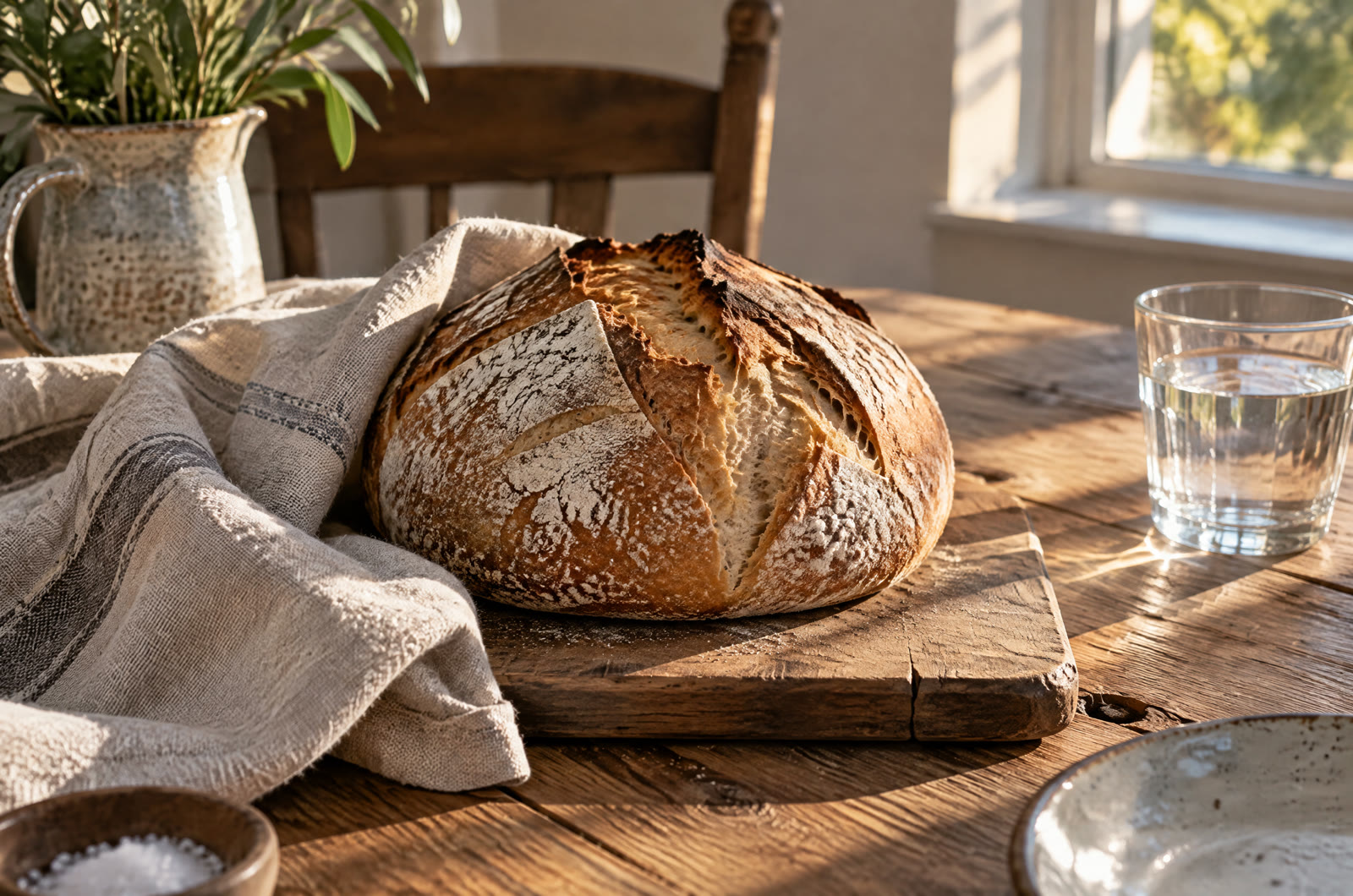
Natural Light and Texture: Bread on a Wooden Table
OpenAI's announcement, which calls the model Images 2.5, says it produces more natural lighting and richer textures. From a prompt describing late afternoon sun on a loaf of sourdough, Sunburst rendered the light falling across the table, the cracked crust, the linen weave and the wood grain. It also added a jug, a plate and a small bowl of salt that the prompt did not mention.
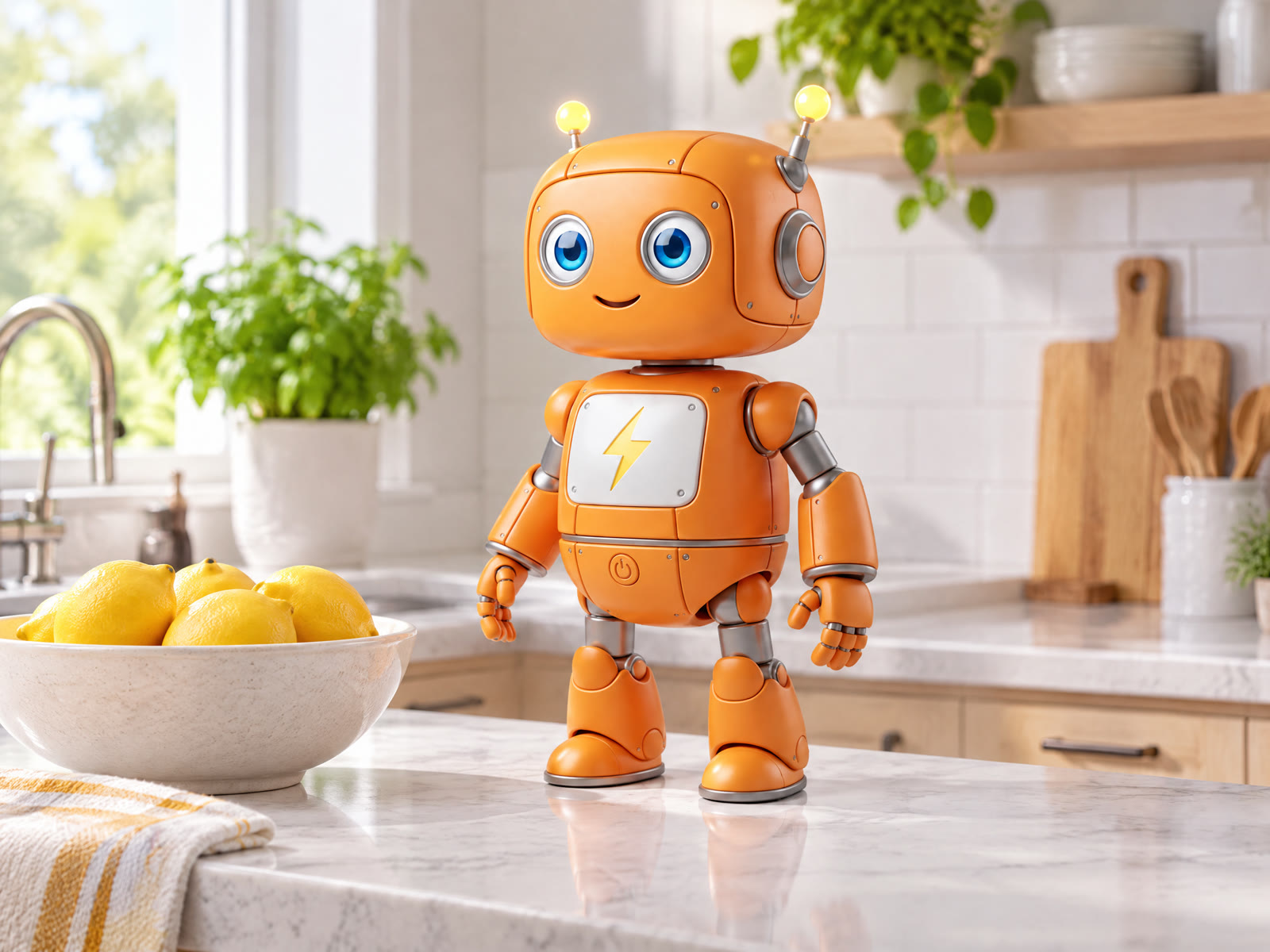
Keeping a Reference Subject: Our Robot in a Kitchen
OpenAI says GPT Image 2.5 is better at preserving the subjects in your reference photos. Given our robot mascot as the reference image, Sunburst placed it on a kitchen counter next to a bowl of lemons and kept its colors, both antennas, its eyes and the lightning icon on its chest.
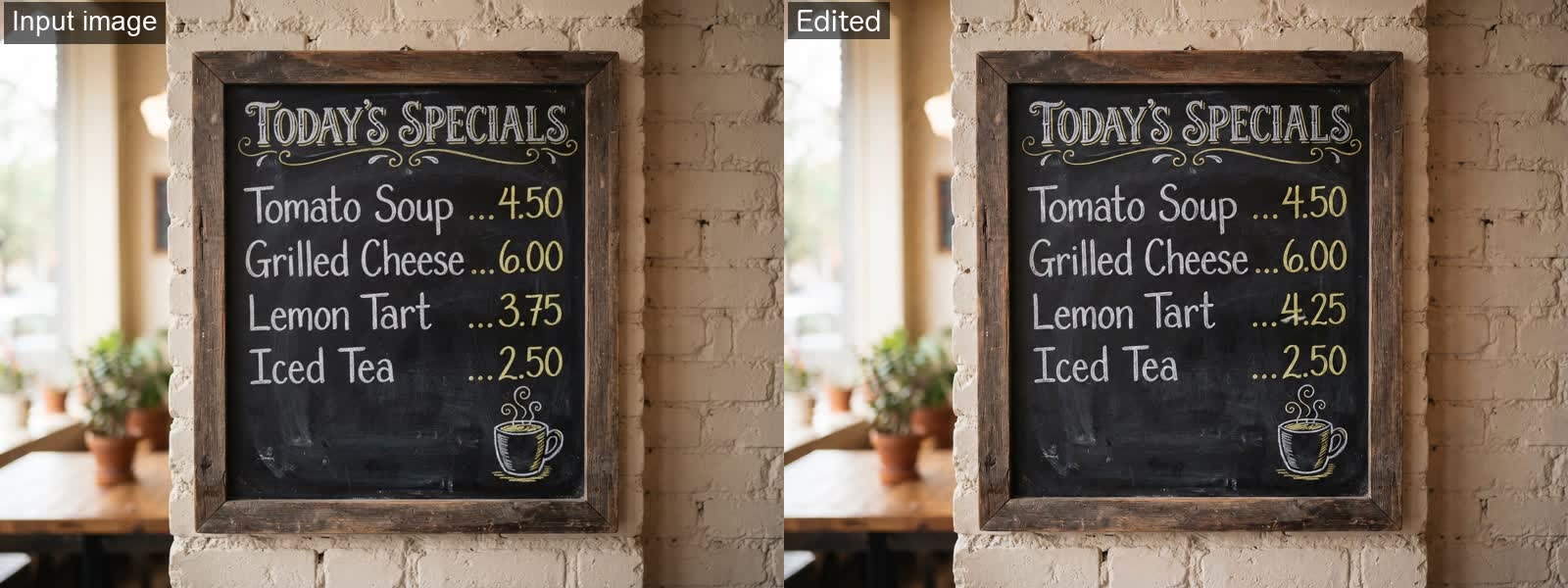
Editing Only What You Ask: One Price on a Chalkboard
OpenAI says GPT Image 2.5 is better at editing only what you've asked for while keeping the rest the same. Asked to change the Lemon Tart price from 3.75 to 4.25, Sunburst changed that one price and left the title, the other dishes and prices, the drawing and the frame as they were (input on the left, edit on the right).
Transparent Backgrounds: A Robot Sticker
With background set to transparent, Sunburst returned a PNG with a transparent background, shown here on a checkerboard; the die-cut sticker kept its white outline.

Typical Uses for GPT Image 2.5
OpenAI says developers build its Images API into products used by creative, marketing, retail and media teams. These are the kinds of work it describes for GPT Image 2.5.
Everyday Images for Apps and Content
Routine images for apps, posts and pages, the everyday image generation OpenAI describes Flare for.
Product and Marketing Edits
Updating a single element, such as a product, background or piece of copy, while keeping the subject, composition and brand treatment around it.
Variations Anchored to a Reference
Reference-led work where new versions of a character or product have to stay close to the original source image.
Detailed Edits Where Precision Matters
Edits where precision matters most, which is the kind of workflow OpenAI points Sunburst at.
How to Use the GPT Image 2.5 API on ModelFold
- 1
Step 1. Get Your API Key
Sign up on ModelFold, open the API Key Management page and create a key. Every request sends it in the Authorization header.
- 2
Step 2. Test Your Prompt in the Playground
You can try this model in the playground on this page without writing code. Run the same prompt on Flare and Sunburst to see which one fits.
- ✓
Step 3. Send the Request and Get the Result
Send a POST request to https://ai.modelfold.online/v1/images/generations with the model name, your prompt and an optional resolution. The response returns the finished image URLs, so there is no task polling or callback to set up. Reference images, aspect ratio, background and the other parameters in the table above can all be tried in the Playground on this page.
Tips Before You Ship
Put Reference Images in input_urls
The image-to-image models take reference images in input_urls, not image_urls. In our test, a request that used image_urls still returned an image but ignored the reference. Reference images must be publicly reachable URLs.
Use 1K for 27:16, 16:27, 9:8 and 8:9
These four aspect ratios support 1K only. In our tests, choosing 2K or 4K with 27:16 failed with an "upstream service is temporarily overloaded" message, and the task records showed 0 credits consumed.
Set background for Transparent Images
Set background to transparent when you need a cut-out; in our tests every result came back as a PNG, and the transparent ones had a real alpha channel. ModelFold's playground notes that at 2K or 4K a transparent background also needs a prompt describing an isolated subject with no backdrop.
Check for Added Details
In our window-light test the model added a jug, a plate and a bowl of salt that the prompt did not mention, so review each image for extra objects before you publish.
Why Use GPT Image 2.5 on ModelFold
Same Key Across the ModelFold Market
All models in the ModelFold market use the same authentication method: an Authorization: Bearer YOUR_API_KEY header with the key from your ModelFold API Key Management page.
Free Credits to Start
New ModelFold users receive 80 free credits for testing. Your account has one credit balance that all generation services draw from; check it in your ModelFold wallet.
Nothing to Host or Install
ModelFold provides this model as an API with a playground; there is no app to download or install. There are no GPUs or model weights to manage.
FAQs About GPT Image 2.5 API
How much does the GPT Image 2.5 API cost?⌄
Pricing for each resolution is shown in the pricing card above. Flare and Sunburst share the same pricing card, and in our tests they used the same credits at the same resolution.
Is GPT Image 2.5 free?⌄
Not on ModelFold: each image uses credits, as shown in the pricing card above. New ModelFold users receive 80 free credits for testing.
What is the difference between ChatGPT Images 2.5 and GPT Image 2.5?⌄
ChatGPT Images 2.5 is the name of the update inside ChatGPT. For developers, OpenAI released it in the API as two models, GPT Image 2.5 Flare and GPT Image 2.5 Sunburst, and those are the models ModelFold provides.
Should I use GPT Image 2.5 Flare or Sunburst?⌄
Sunburst for quality; Flare when OpenAI's speed-oriented variant fits your use and GPT Image 2-level quality is enough — compare both on the same inputs. The comparison table above shows our side-by-side tests.
Which GPT Image model came after GPT Image 2?⌄
OpenAI released GPT Image 2.5 Flare and GPT Image 2.5 Sunburst in September 2026, after GPT Image 2. On LMArena both are still marked preliminary; the comparison table above has their scores.
Can I download GPT Image 2.5 or run it locally?⌄
No. GPT Image 2.5 is a proprietary OpenAI model offered through ChatGPT and the API: as of October 2026, OpenAI's Hugging Face page lists no GPT Image 2 or 2.5 weights, and LMArena lists both versions as proprietary. ModelFold provides this model as an API with a playground; there is no app to download or install.
How do I get a GPT Image 2.5 API key?⌄
Create one on the API Key Management page after you sign up on ModelFold. The steps above show where the key goes in a request.
Does GPT Image 2.5 support transparent backgrounds?⌄
Yes. Set background to transparent; in our tests both Flare and Sunburst returned PNG files with a real transparent background, like the sticker example above.
What resolutions does GPT Image 2.5 support?⌄
1K, 2K or 4K, set with the resolution parameter. Four aspect ratios are available at 1K only; the parameter table above lists them along with the sizes we measured.
How many reference images can GPT Image 2.5 use?⌄
Up to 16 image URLs per request, passed in input_urls to the image-to-image models.
| GPT Image 2 5 Flare Text To Image | |
| 1K | 10 credits / image |
| 2K | 13 credits / image |
| 4K | 20 credits / image |
| GPT Image 2 5 Flare Image To Image | |
| 1K | 10 credits / image |
| 2K | 13 credits / image |
| 4K | 20 credits / image |
| GPT Image 2 5 Sunburst Image To Image | |
| 1K | 8 credits / image |
| 2K | 13 credits / image |
| 4K | 20 credits / image |
| GPT Image 2 5 Sunburst Text To Image | |
| 1K | 8 credits / image |
| 2K | 13 credits / image |
| 4K | 20 credits / image |
curl https://ai.modelfold.online/v1/images/generations \
  -H "Authorization: Bearer $MODELFOLD_API_KEY" \
  -H "Content-Type: application/json" \
  -d '{"model":"gpt-image-2-5-flare-text-to-image","prompt":"..."}'