 ModelFold
ideogram/character
Ideogram Character is the latest feature released by Ideogram AI, ensuring characters retain core features such as facial traits, proportions, and hairstyles across different scenes, artistic styles, and contexts. Whether creating characters from a single reference image or fine-tuning existing ones, ModelFold's Ideogram Character API offers flexibility and precision through its Base, Edit, and Remix operations.
Precio: 18 créditos / imagen.

Explorar más modelos de Image to Image
Modelos de IA recientes y populares
Ideogram Character API: Ensuring Perfect Character Consistency in Every Scene
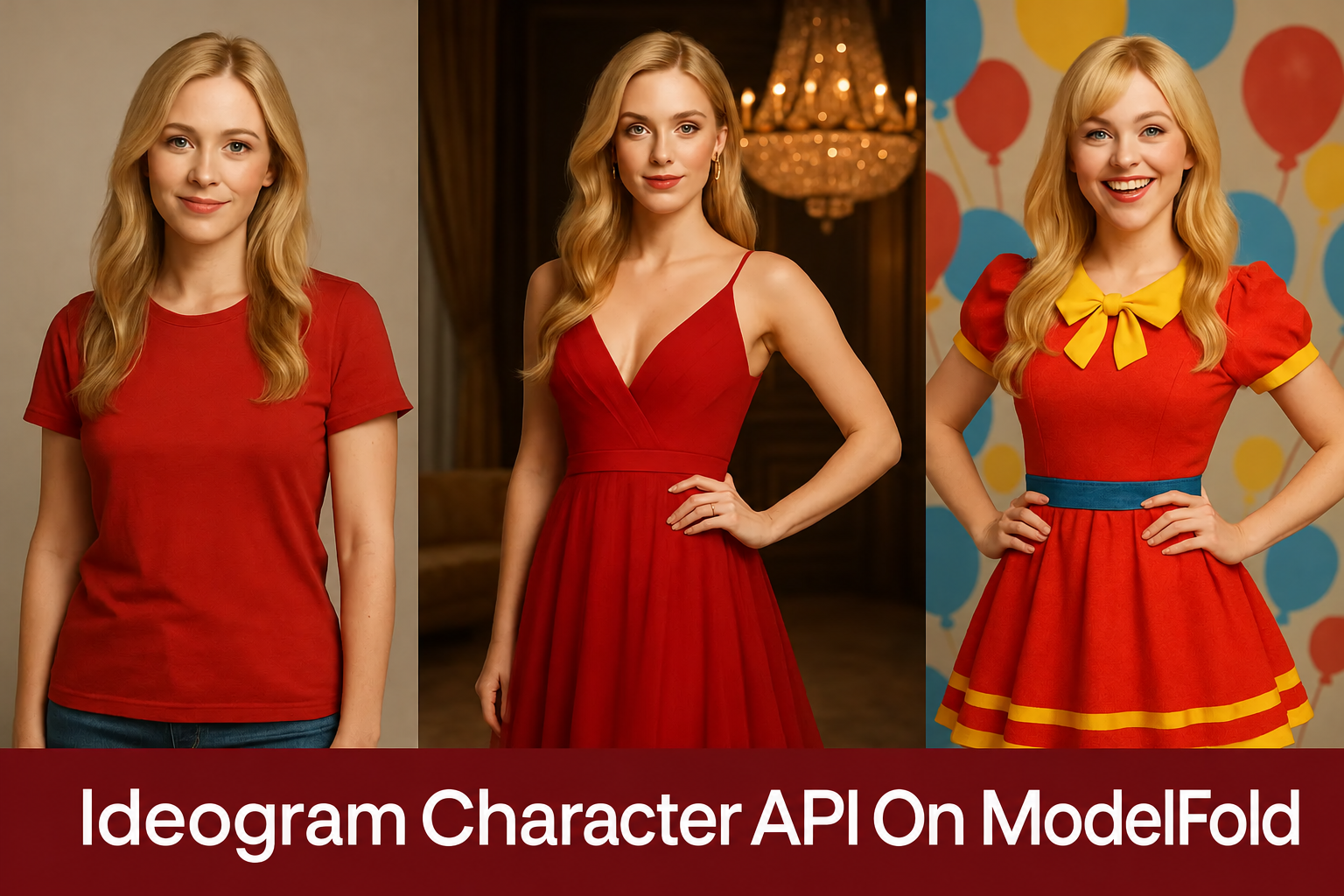
ModelFold's Ideogram Character API lets you seamlessly generate, edit, and remix characters while maintaining consistent visual identity across different styles and contexts.
What is Ideogram Character API
Ideogram Character is a groundbreaking character consistency model developed by Ideogram AI, designed to generate infinite variations of characters—both real and fictional—using just a single reference image. Leveraging advanced facial and hair detection algorithms, this Character Consistency Model creates a precise identity map that preserves core traits such as facial features, proportions, and distinctive characteristics across diverse scenes, styles, and contexts, ensuring striking visual fidelity and high-fidelity output even in complex transformations. Building on this innovative foundation, the Ideogram Character API extends these capabilities to developers and creators, enabling seamless integration for applications in storytelling, branding, and personalized visual generation workflows. ModelFold provides access to Ideogram Character API, offering flexible endpoints for base generation, edit, and remix operations, with options for Ideogram Character API Free trials to facilitate easy adoption and exploration of its Ideogram Character Consistency features.
What You Can Do with ModelFold's Ideogram Character API
Ideogram Character API Base
Ideogram Character API’s Base operation enables the creation of visually consistent character images from a single reference. By supplying a clear image and a descriptive prompt, users can generate new scenes or poses while maintaining defining traits like facial structure and hairstyle.
Ideogram Character API Edit
With the Ideogram Character API’s Edit operation, creators can fine-tune generated or existing characters without sacrificing identity consistency. It allows adjustments to pose, expression, clothing, or even mask regions—facilitating precise control over how the character appears.
Ideogram Character API Remix
Ideogram Character API’s Remix operation transforms consistent characters into new artistic styles or scenarios. By combining a reference image with a prompt, it enables seamless style transfer while preserving the character’s recognizable features and identity.
ModelFold's Ideogram Character API Tutorial: Professional Access Guide
- 1
Obtain Your Ideogram Character API Key
Register on ModelFold and create a key on the API Key page. Authenticate API requests with Authorization: Bearer and keep the key private.
- 2
Configure Your Ideogram Character API Request
Select ideogram/character, ideogram/character-edit or ideogram/character-remix. Supply the required reference image, prompt, input image and mask for the selected operation. Rendering speed and style options are listed in the Playground.
- 3
Submit the Ideogram Character API Request
Send a POST request to /v1/images/generations with your ModelFold API key in the Authorization header. Set model, prompt and the image parameters required by the selected variant. See the API example on this page.
- ✓
Monitor and Retrieve Results
The Playground tracks generation in the background and provides preview and download links when complete. API integrations receive results from /v1/images/generations. Task status and historical outputs are available in account usage logs.
Why Choose ModelFold for Your Ideogram Character API Platform
One Character Reference Image per Request
All three Ideogram Character models take the character in reference_image_urls (JPEG, PNG or WebP, up to 10MB). Only 1 reference image is currently supported, and any extra images are ignored.
Generate, Edit or Remix the Same Character
ideogram/character generates a character in a new scene from a prompt up to 5,000 characters. Character Edit inpaints an image using a matching mask, while Character Remix uses strength from 0.1 to 1 (default 0.8) and optional style references. Output count depends on the platform API.
Rendering Speed and Style Controls
rendering_speed is TURBO, BALANCED (default) or QUALITY, style is AUTO (default), REALISTIC or FICTION, and expand_prompt turns MagicPrompt on or off. Pricing for each rendering speed is shown in the pricing card above.
Track Generation and Download Results
Use the Playground to track background generation, preview and download completed images. Account usage logs retain task status and outputs. API integrations use the ModelFold image generation endpoint shown on this page.
Comparing Ideogram Character with Nano Banana and Flux Kontext in Character Consistency
Ideogram Character delivers exceptional consistency in generating character variations from a single reference image, making it a powerful tool for storytelling, branding, and photorealistic content creation. Its intuitive operations, including base generation, edit, and remix, provide creators with unmatched flexibility. As the AI image generation landscape evolves, emerging models like Nano Banana AI and Flux AI (Flux Kontext) have gained attention for their innovative approaches to character consistency and editing. The table below compares Ideogram Character with these models across key performance metrics.
| Feature | Ideogram Character | Nano Banana | Flux Kontext |
|---|---|---|---|
| Text and Image Upload Support | Supports single reference image uploads with detailed text prompts for scene and style customization | Supports text prompts and image uploads, with integrated editing for precise modifications | Supports both text prompts and image uploads, with advanced inpainting and depth control |
| Prompt Understanding | Excels at interpreting detailed prompts for character placement and style transfer, with automated facial/hair detection | Handles complex, multi-step instructions with high accuracy, ideal for precise text-based edits | Strong text-to-image capability with reliable fidelity, enhanced by semantic understanding |
| Style and Consistency | Superior Ideogram Character Consistency, preserving character identity across scenes and styles | Maintains character and background stability across variations, with strong scene coherence | Provides stable results with flexible outputs, but may struggle with complex scene relationships |
| Resolution and Detail | High-fidelity output with precise detail retention for photorealistic character rendering | High-resolution output with fine detail retention, especially for character restoration | Multiple model tiers (e.g., Dev, Pro, Max) balance detail and performance, up to ~4 MP outputs |
Tips for Using Ideogram Character API Effectively
Choose a High-Quality Reference Image
Select a single reference image with clear facial features in a frontal or ¾ view. High-resolution images with good lighting and no obstructions (e.g., shadows or blurriness) ensure Ideogram Character API accurately captures traits like facial structure or hair, enhancing consistency. For example, a sharp portrait outperforms a low-quality or angled photo.
Craft Precise Text Prompts
Write detailed text prompts specifying the setting, mood, or style, such as “a character on a vibrant tropical beach under natural light” or “a figure in a dramatic, dimly lit ballroom.” Avoid vague prompts to ensure Ideogram Character API produces accurate outputs. Include descriptors like “photorealistic” or “cinematic” for tailored results.
Use Consistent Reference Images
Maintain the same high-quality reference image across different prompts to ensure Ideogram Character Consistency. This helps preserve the character’s core identity when generating variations in diverse contexts, such as “a character in a futuristic city” or “a character in a historical setting.”
Ensure Input Compatibility
Verify that the reference image meets Ideogram Character’s requirements (clear facial features) and that text prompts are concise yet descriptive to avoid misinterpretation. For complex scenes, include specific components (e.g., background, lighting, character action) to improve output accuracy.
FAQs About ModelFold's Ideogram Character API
What is the Ideogram Character API?⌄
The Ideogram Character is a feature developed by Ideogram AI that allows users to generate and customize character images. By using a single reference image, Ideogram Character API ensures that characters maintain their key features—such as facial structure and proportions—across different scenes and artistic styles, making it ideal for applications in storytelling, branding, and visual content creation.
How does the Ideogram Character API maintain consistency in character design?⌄
The Ideogram Character API ensures that characters remain visually consistent by preserving key features like facial traits, hair, and body proportions. This allows the same character to appear naturally in various contexts, whether it’s different poses, backgrounds, or artistic styles, without losing its distinct identity.
What can I do with the Ideogram Character API On ModelFold?⌄
Our Ideogram Character API provides three main functions: generating new character images from a single reference, editing existing characters, and transforming them into different artistic styles. These tools enable creators to customize characters, refine their details, and apply style changes while maintaining the core visual identity.
Is there a free trial for the Ideogram Character API?⌄
If your account has promotional credits, you can use them in the Playground. Requests are charged at the displayed rates. Available grants and balances are shown in your account.
How do I get started with the Ideogram Character API?⌄
To start using the Ideogram Character API, create an account on ModelFold and generate an API key. This key will allow you to authenticate your requests. You can then set up API calls to generate, edit, or remix characters by providing a reference image and prompts. ModelFold’s documentation provides step-by-step instructions for a smooth integration process.
How does the Ideogram Character API compare to other character generation tools?⌄
The Ideogram Character API stands out due to its ability to maintain a character’s core features across different transformations. Unlike other tools, it ensures that even when characters are placed in new settings or artistic styles, they retain their identity—such as facial features and proportions—allowing for seamless transitions in a variety of creative contexts.
Can the Ideogram Character API create characters in different artistic styles?⌄
Yes, our Ideogram Character API allows you to transform characters into various artistic styles. Whether you’re looking to create a photorealistic image, a cartoon version, or something from a historical or fantasy setting, the API can adapt characters to different visual aesthetics while preserving their original features.
What are the best practices for using the Ideogram Character API?⌄
To get the best results, it’s important to provide a high-quality reference image with clear facial features and good lighting. Be specific in your prompts to describe the desired scene or style accurately. Consistently use the same reference image to maintain character identity across different transformations. Additionally, make sure that your input meets the API’s guidelines to achieve optimal results.
| character | 18 créditos image |
| character edit | 18 créditos image |
| character remix | 18 créditos image |
Precio fijo por ejecución, independientemente de la duración.
curl https://ai.modelfold.online/v1/images/generations \
  -H "Authorization: Bearer $MODELFOLD_API_KEY" \
  -H "Content-Type: application/json" \
  -d '{"model":"ideogram/character","prompt":"..."}'